Stemly Convert — Mac & iOS
Convert audio.
Keep every folder.
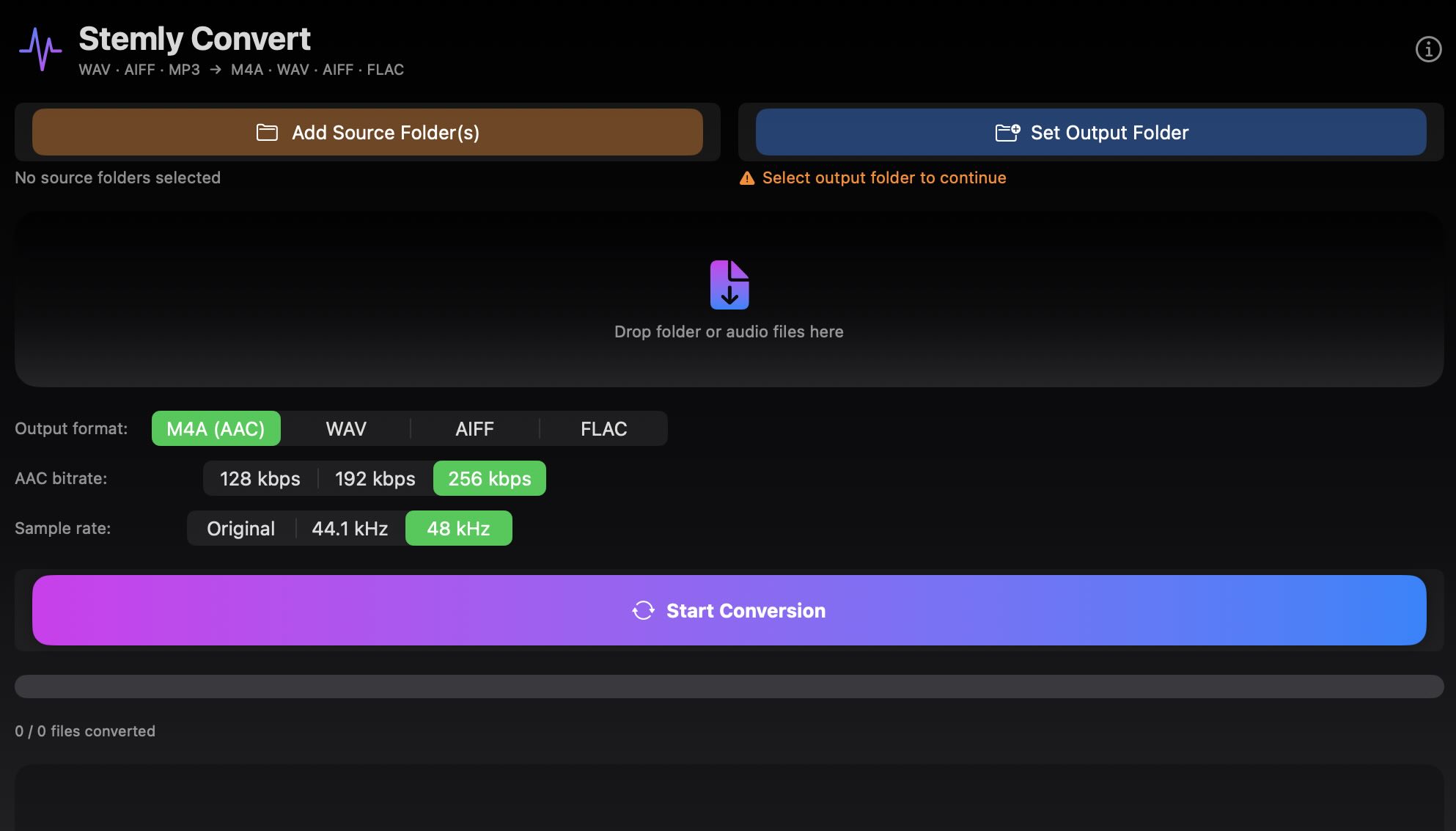
Batch audio converter for Mac and iPhone/iPad. Drop files or folders, pick your format — WAV, M4A, AIFF or FLAC — Stemly Convert processes everything while preserving your original folder structure.
4
Output Formats
∞
Files at Once
100%
Offline
📁
Folder Structure Preserved
Sub-folders, naming and organisation stay exactly as they are. Just converted.
🎵
WAV, M4A, AIFF, FLAC
Lossless or compressed — you choose per conversion. MP3 supported as input.
⚙
Quality Control
Pick sample rate (44.1 / 48 / 96 kHz) and bit depth (16 / 24-bit) for WAV and AIFF. Bitrate for M4A.
🔒
100% Offline
No cloud, no account, no uploads. Everything stays on your device.
Most Used
WAV
Lossless — universal
- 16-bit or 24-bit
- 44.1 / 48 / 96 kHz
- Works with every DAW
- Best for Stemly stems
Streaming
M4A (AAC)
Compressed — Apple ecosystem
- 128 / 192 / 256 kbps
- Native Apple format
- Plays on every Apple device
Lossless
AIFF
Lossless — 24-bit
- Zero quality loss
- 16-bit or 24-bit
- Standard for Pro Tools & Logic
Lossless
FLAC
Lossless — compressed
- Zero quality loss
- Smaller than AIFF/WAV
- Universal archiving format
Three steps. Done.
No setup, no configuration. Just convert.
1
Drop files or folders
Drag audio files or entire folder trees into the app
›
2
Pick format & quality
Choose output format, sample rate, bit depth and output folder
›
3
Convert
All files processed at once, folder structure preserved
Mac
Stemly Convert
macOS 13 Ventura or later
- WAV, M4A, AIFF, FLAC output
- Batch conversion with drag & drop
- Folder structure preserved
- Sample rate & bit depth control
- 100% offline
iPhone & iPad
Stemly Convert
iOS 16 or later
- WAV, M4A, AIFF, FLAC output
- Import from Files, iCloud Drive
- Folder structure preserved
- Sample rate & bit depth control
- 100% offline
🔒 Everything stays on your device
Stemly Convert converts locally using built-in system tools. No audio is ever sent anywhere.
✓ No cloud uploads
✓ No internet required
✓ No account needed
✓ No telemetry
Mac: macOS 13 Ventura or later • Apple Silicon or Intel • iOS: iPhone or iPad, iOS 16 or later
Stemly Convert — Mac & iOS
Konwertuj audio.
Zachowaj każdy folder.
Wsadowy konwerter audio dla Mac oraz iPhone/iPad. Przeciągnij pliki lub foldery, wybierz format — WAV, M4A, AIFF lub FLAC — Stemly Convert przetworzy wszystko zachowując oryginalną strukturę katalogów.
4
Formaty wyjściowe
∞
Pliki na raz
100%
Offline
📁
Struktura folderów zachowana
Podfoldery, nazwy plików i organizacja zostają dokładnie takie same. Tylko skonwertowane.
🎵
WAV, M4A, AIFF, FLAC
Bezstratnie lub skompresowane — ty decydujesz. MP3 obsługiwany jako format wejściowy.
⚙
Kontrola jakości
Częstotliwość próbkowania (44,1 / 48 / 96 kHz) i głębokość bitowa (16 / 24-bit) dla WAV i AIFF. Bitrate dla M4A.
🔒
100% offline
Bez chmury, bez konta, bez wysyłania plików. Wszystko zostaje na Twoim urządzeniu.
Najczęściej używany
WAV
Bezstratny — uniwersalny
- 16-bit lub 24-bit
- 44,1 / 48 / 96 kHz
- Działa z każdym DAW
- Idealny do stemów Stemly
Streaming
M4A (AAC)
Skompresowany — ekosystem Apple
- 128 / 192 / 256 kbps
- Natywny format Apple
- Działa na każdym urządzeniu Apple
Bezstratny
AIFF
Bezstratny — 24-bit
- Zero utraty jakości
- 16-bit lub 24-bit
- Standard dla Pro Tools i Logic
Bezstratny
FLAC
Bezstratny — skompresowany
- Zero utraty jakości
- Mniejszy niż AIFF/WAV
- Uniwersalny format archiwizacji
Trzy kroki. Gotowe.
Żadnej konfiguracji. Po prostu konwertuj.
1
Przeciągnij pliki lub foldery
Przeciągnij pliki audio lub całe drzewa folderów do aplikacji
›
2
Wybierz format i jakość
Wybierz format wyjściowy, częstotliwość próbkowania, głębokość bitową i folder docelowy
›
3
Konwertuj
Wszystkie pliki przetwarzane jednocześnie, struktura folderów zachowana
Mac
Stemly Convert
macOS 13 Ventura lub nowszy
- Wyjście WAV, M4A, AIFF, FLAC
- Konwersja wsadowa z drag & drop
- Struktura folderów zachowana
- Kontrola częstotliwości i głębokości bitowej
- 100% offline
iPhone & iPad
Stemly Convert
iOS 16 lub nowszy
- Wyjście WAV, M4A, AIFF, FLAC
- Import z Plików, iCloud Drive
- Struktura folderów zachowana
- Kontrola częstotliwości i głębokości bitowej
- 100% offline
🔒 Wszystko zostaje na Twoim urządzeniu
Stemly Convert konwertuje lokalnie używając wbudowanych narzędzi systemowych. Żaden plik audio nie jest nigdzie wysyłany.
✓ Bez wysyłania do chmury
✓ Bez internetu
✓ Bez konta
✓ Bez telemetrii
Mac: macOS 13 Ventura lub nowszy • Apple Silicon lub Intel • iOS: iPhone lub iPad, iOS 16 lub nowszy